
Solutions
One PhaseBid workflow, tailored by use case.
Switch between estimating, electrician, contractor, proposal, and bid workflows without repeating the same marketing page five times.
Electrical estimating software
Electrical estimating software that keeps contractors in control.
PhaseBid helps electrical contractors organize scope notes, draft estimates, review labor and material details, and create professional proposal PDFs from one connected workspace.
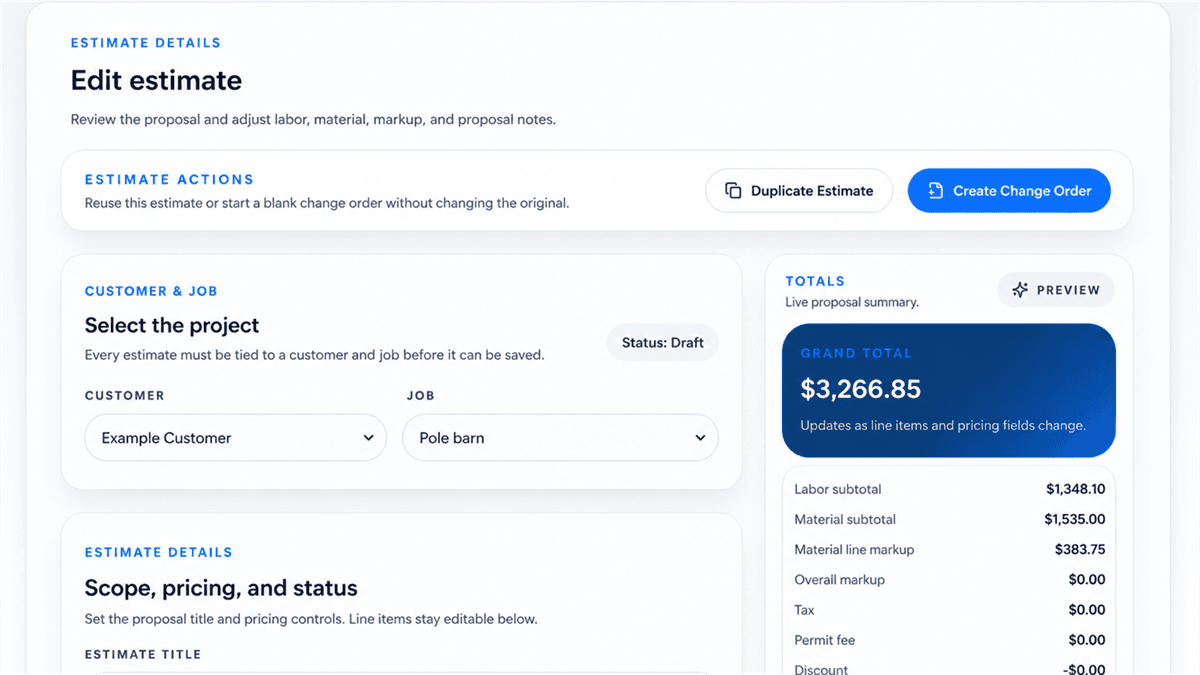
Editable estimate review
Example workspace data shown. Contractors review labor, materials, markup, permit fees, assumptions, exclusions, and totals before sending.
Start with a clearer draft
Use job notes, templates, saved pricebook items, or an AI-assisted draft to create an estimate structure you can inspect before it becomes customer-facing.
- Editable labor and material lines
- Assumptions and exclusions kept with the estimate
- Proposal notes tied to the reviewed estimate
Keep pricing review visible
PhaseBid presents estimate totals and line details in an editable workflow so contractors can verify local pricing, labor, materials, markup, taxes, and job conditions.
- Reviewable totals and line items
- Contractor-controlled adjustments
- Contractor review remains part of the workflow
Move from estimate to proposal
After review, the estimate can become a clean customer-facing proposal PDF with scope, assumptions, exclusions, terms, and totals in one place.
- Professional proposal preview
- Customer and job details included
- Estimate history stays connected to the workspace
Review process
A safer estimate-to-proposal workflow
PhaseBid is designed around contractor review rather than automatic final bids.
- 1
Capture scope
Add customer, site, project type, notes, schedule needs, and important job details.
- 2
Draft the estimate
Start from manual entry, templates, pricebook items, or an AI-assisted estimate draft.
- 3
Review details
Check labor, materials, quantities, pricing, assumptions, exclusions, permits, and AHJ requirements.
- 4
Create the proposal
Generate a professional proposal PDF only after the estimate has been reviewed.
“Estimating software should help contractors move faster without hiding the details that need professional review. PhaseBid keeps the bid workflow organized while leaving final decisions with the contractor.”
Built for the estimating work before the customer sees a proposal.
Browse related resources